KasusKnacker: Building and Shipping a German Practice App with AI
TL;DR: I built an app for practicing German called KasusKnacker, available on Web, iOS and Android. What’s interesting isn’t the app, but the process: I built the entire product mostly with AI, including software, learning content generation, translations, copywriting, and visual assets. AI made it possible to create ~30,000 exercises with explanations/translations in a few hours for under 150€ (including QA passes). It also drastically reduced the time to prototype and ship multi-platform features. However, AI is not a magic bullet: it tends to generate duplicated code, fragile architecture, and naïve implementations around security and costs. In Firebase-style stacks, this can easily translate into real billing risk. AI multiplies productivity — and mistakes. Human review is not optional.
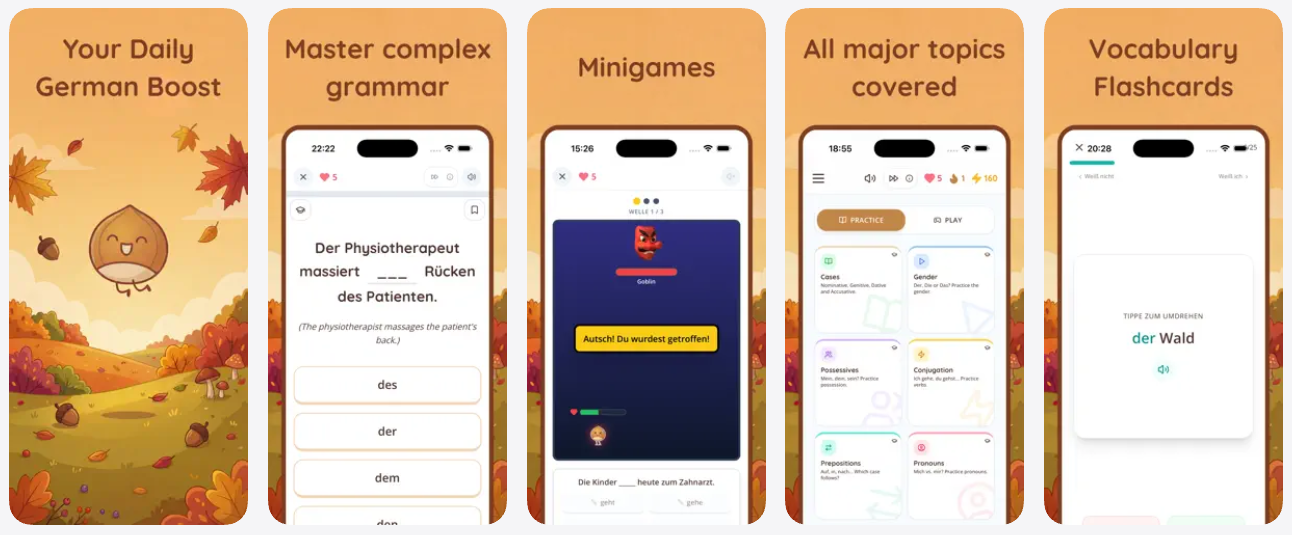
I previously wrote about AI-assisted coding in AI in Coding: My Two Cents. This post is the practical follow-up: building and shipping a real product mostly with AI tools, and what worked vs. what didn’t. It’s basically my “what actually happened” log.
KasusKnacker is a German practice app. It focuses on the grammar gaps many expats keep for years (der/die/das, cases, prepositions, conjugation), and it also includes flashcards for vocabulary and idioms.
I originally built it as a hobby project for myself. I’m Spanish, I’ve lived in Germany for over 12 years, and since I never formally studied German, I still hit the same grammar potholes. The app is basically training for exactly that.
But I also used the app as an experiment: could I build an entire product end-to-end using AI, not only for coding, but for everything else that usually blocks solo projects (content, translations, design assets, marketing copy, etc.)? I wanted a real answer, not a demo.
My AI Tool Usage
For coding, I used a mix of Antigravity (Gemini 3 Flash and Gemini 3 Pro), Claude Code (Opus 4.5) and Codex (GPT-5.2). I’d usually ask two models the same question and see where they disagreed.
For generating exercises and translations, I used Gemini 3 Flash and Gemini 3 Pro.
For app and website copy, I used GPT-5.2.
For images (logo, avatars and social media visuals), I used nano banana.
My workflow was to run multiple models for the same task and compare results. This is especially useful for higher-level code changes (architecture, refactoring, SDK usage), where models often disagree. When they disagree, it’s a signal that the task has complexity that deserves careful review.
What I’ve Learned
Software development has already changed
I don’t know if AGI will come soon or not. The label is not important.
What matters is that for software development, the paradigm already changed. For an experienced developer (especially someone used to working across dev + ops), AI tools drastically reduce the time required to build and ship products. I felt that shift almost immediately.
Not by replacing engineering, but by compressing the execution layer: writing boilerplate, generating repetitive code, composing UI pieces, writing tests, producing documentation, etc.
But the real effect is scope. A solo developer can now deliver projects that used to require a team, mainly because the AI tools reduce friction across multiple disciplines (coding, content, design, copywriting). That’s the part that still surprises me.
The biggest impact wasn’t coding. It was content.
For educational apps, content generation is the real bottleneck. The code is the easy part.
KasusKnacker includes roughly 30,000 exercises, each with translations and explanations. Without AI, producing that amount of content would have been unrealistic for a solo developer. It would require either a long timeline or a paid team (and still plenty of QA work).
With AI, it became an engineering process: define a schema, generate in batches, validate automatically, then apply QA passes.
I generated the entire set in a few hours for under 150€ including QA passes. That number felt unreal when I saw the final bill.
That was the first moment I felt AI doesn’t just make you faster. It changes what is possible.
AI removed most of the design bottleneck
Design and assets are another classic blocker for solo apps. You can ship functional software, but without coherent visuals it will look unfinished.
Without AI, I would have needed a designer for logo, avatars, and a lot of visual content used across the app, website and social media. With AI, I produced enough assets to ship a coherent product. Some of them I iterated on for days, but at least I could iterate at all.
No, it’s not a substitute for good professional design. But it’s sufficient for shipping a real app.
AI productivity is real, but quality control is mandatory
AI makes you more productive, but it is not a magic tool. It definitely fooled me a couple of times.
It generates a lot of code quickly, but it also generates duplicated implementations, wrong assumptions, weak error handling, unnecessary complexity, and subtle bugs that are easy to miss.
Even if your prompts are good.
It is also common for AI-generated code to work while still being structurally wrong: mixing SDKs, bypassing best practices, or creating a fragile architecture that becomes hard to maintain. I saw this happen more than once.
AI is good at execution, not at engineering judgment. You still need to review, refactor, and simplify.
Key Limitations (Real Examples)
1. AI-generated content still needs QA
Around 2% of generated exercises contained actual errors (wrong answer, wrong translation, wrong explanation). That’s not huge, but with 30,000 items it becomes a lot of broken content.
More importantly, around 18% of exercises needed improvements. Not because they were objectively wrong, but because they were not aligned with the intended level/topic. Common issues were overly long questions, ambiguity (multiple answers could be correct), unnecessary complexity, or translations that were technically correct but confusing.
This is where most AI content generation projects fail. Generating content is easy. Generating good content at scale is not.
My solution was to use AI against itself: run review passes that validate the content and request corrections. This improved quality massively, and reduced the amount of manual cleanup needed. It also made the remaining fixes feel manageable.
2. Context handling issues lead to duplication and fragile codebases
The app went from idea to working product very quickly. Multi-platform support (web + native) was not a big problem.
But despite good prompting, AI still tends to introduce duplication and architectural drift. It frequently forgets existing abstractions and re-implements things. It also tends to patch forward: if something fails, it adds another layer rather than simplifying the original code.
A concrete example: mixing approaches between Firebase web SDK and the Capacitor-native SDK for auth. It can be made to work, but the result becomes fragile and hard to reason about. I ended up standardizing just to keep my sanity.
So after the first “it works” stage, you should expect a deliberate cleanup stage: consolidating duplicated code, removing incorrect approaches, enforcing one architecture, and adding error handling.
3. Security and costs are the most dangerous blind spots
For real products, this is the most important limitation.
AI tends to generate naïve implementations around security boundaries and abuse scenarios. It can generate code that works perfectly and at the same time creates billing risks, privilege escalation paths, or insecure data flows. This is the part that worried me most.
In Firebase-style architectures, abuse becomes billing. If your database rules and backend architecture are not designed with abuse in mind, vibe coding can literally become expensive.
During review I found and fixed multiple risk patterns: inefficient backend usage, possible billing attacks against Firestore/Functions, and client-side logic that should never be trusted (e.g. users being able to modify critical fields such as premium subscription state).
After manually reviewing and optimizing the architecture, I reduced projected hosting costs by roughly 95%. Not because I changed infrastructure, but because the initial AI-generated approach was inefficient and too permissive. That was an expensive lesson I got to avoid.
This is a strong warning for anyone shipping AI-generated production systems: if you don’t understand your stack deeply, AI will happily generate something that becomes a future liability.
How to Use AI Effectively (My Current Process)
AI works best when the developer acts as an architect.
The model should not be the driver. It should be the execution engine. Your job is to define the structure, constraints, and quality bar.
In practice that means you break work into smaller tasks, you provide explicit constraints (stack, libraries, patterns), and you review every output critically. I treat it like delegating to a smart but rushed teammate.
You should treat AI output like code written by a junior developer: it can be useful, but it must be checked, simplified, and tested.
And importantly: when building production systems, always consider security and billing early. AI will not protect you there. If anything, it increases your exposure because it makes it so easy to ship quickly without thinking about abuse scenarios.